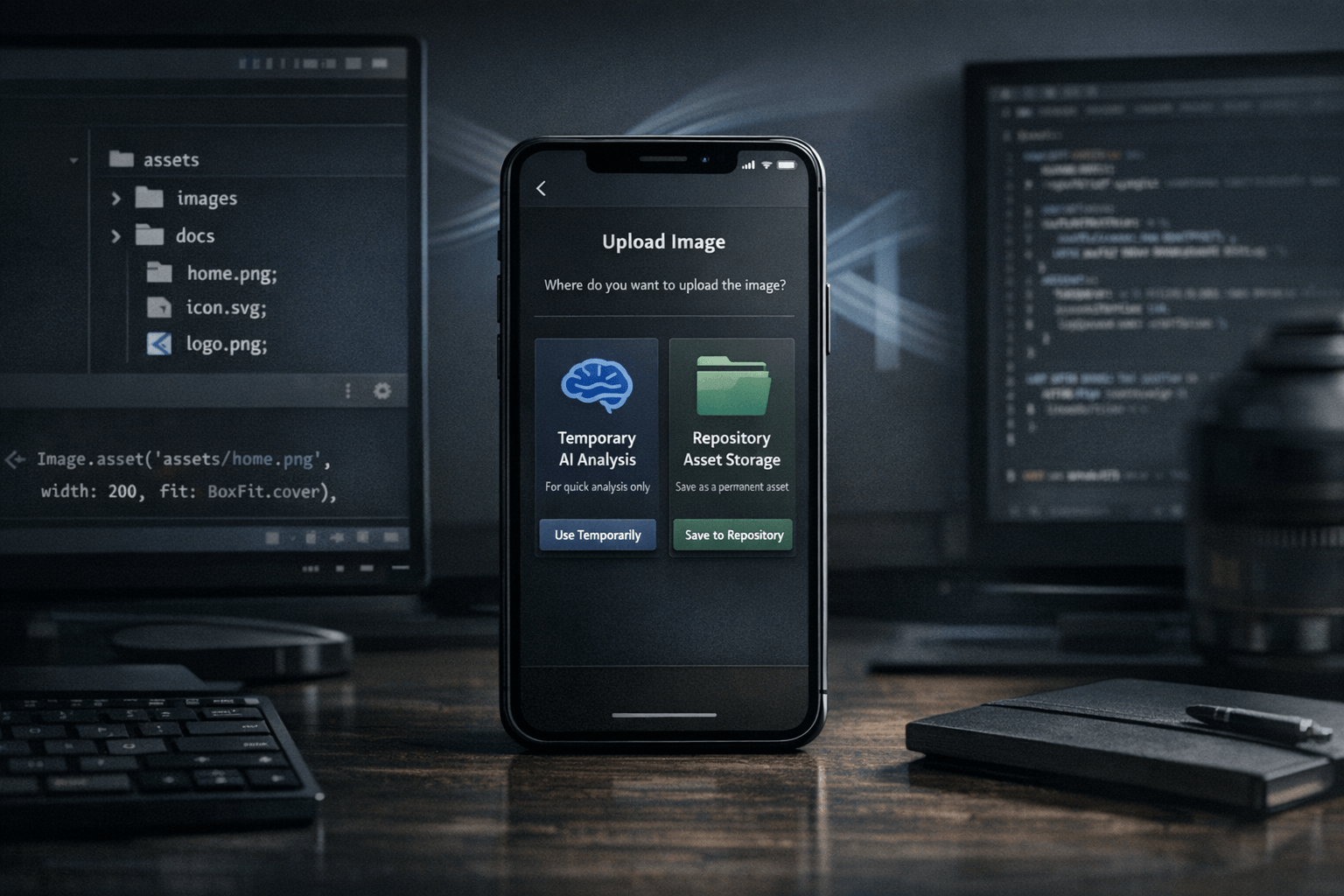
The key idea is simple: not every image sent to an agent should be treated as the same kind of input. A screenshot shared only so the model can inspect an error state is one thing. A logo, mockup, reference image or UI capture that should live inside the codebase is another. Nic Hyper Flow makes that difference operational instead of implicit, and that makes the phone a more serious input surface for software work.
Summary
Flutter's asset documentation explains that bundled assets are declared in pubspec.yaml and then loaded at runtime with tools such as AssetImage or Image.asset. GitHub's repository documentation, meanwhile, describes file uploads and commits as repository changes with branch, ruleset and size constraints. Those are different categories of action: one is temporary analysis context, the other is project state.
Nic Hyper Flow's mobile upload flow is useful because it exposes that distinction at the moment a file is sent. A developer on a phone can decide whether the image should help the agent reason temporarily or become a repository asset that can later be referenced in code, committed, reviewed and kept with the rest of the project.
What happened
The workflow highlighted here is a mobile-to-repo path. Instead of treating the phone only as a place to ask questions or attach screenshots conversationally, Nic Hyper Flow allows the user to send an image in two different ways. One path sends the image to the agent for inspection, interpretation or debugging help. The other path stores the file directly in the repository as an asset.
That may sound small, but it changes the role of the phone. The device stops being only a source of ephemeral context and becomes a direct entry point for repository material.
Why it matters
In ordinary chat tools, an uploaded image often behaves like conversation state: useful now, hard to reuse later. Development work, however, frequently needs images that outlive the conversation. Screens for documentation, design references, icons, temporary QA captures, and marketing or support visuals often need to exist as tracked files with stable paths.
Once an image becomes a repository asset, it can participate in normal engineering workflows. It can be renamed, reviewed, moved, versioned, referenced in documentation, and loaded by the application itself. In a Flutter project, that matters because a file in the repository can be declared in pubspec.yaml and then used through Image.asset(...) or related asset-loading mechanisms.
The practical distinction is this: analysis-only images help the agent think for a moment, while repository assets become part of the project's durable surface area.
Analysis only vs. repository asset
The analysis-only path is appropriate when the image is evidence, not deliverable. For example, a phone screenshot of a rendering bug can help the agent diagnose spacing, overflow, clipping or state problems. After the discussion, the image does not necessarily need to remain in the repository.
The repository asset path is appropriate when the image should continue to exist as a project file. That includes examples such as a support screenshot to be included in docs, a visual reference for a feature branch, a replacement icon, a hero image for a landing page, or a captured asset that developers expect to reference from code later.
This distinction also reduces ambiguity. Without it, teams risk mixing disposable chat evidence with files that should be versioned and discoverable. Nic Hyper Flow makes the user choose explicitly, which improves intent and keeps repository storage aligned with actual project needs.
Developer use cases
Several realistic workflows benefit from this model. A developer can capture a UI issue on a phone and send it only for agent analysis while debugging a Flutter screen. Later, the same developer can save a polished replacement image to the repository because it is meant to ship with the app or appear in project documentation.
Another common case is design handoff while away from the desk. A product owner or developer can collect a visual reference on a phone and place it directly into the repository so the team has a shared tracked file instead of a lost chat attachment. The same logic applies to tutorial screenshots, release-note imagery, README assets and test fixtures.
For Flutter specifically, the benefit is easy to understand: if the file belongs to the app, it should exist where the app can load it. The Flutter documentation is explicit that assets are bundled from paths declared in the project. A repository-stored image fits that model; a temporary attachment does not.
Connection to Nic Hyper Flow
Nic Hyper Flow is useful here because it does not flatten every upload into the same behavior. It acknowledges that developers work across transient reasoning and persistent project state. A phone image can support one of those goals or the other, and the system lets the user decide at the point of capture.
That is particularly relevant for mobile-first development habits. Teams already capture evidence, references and UI states on phones all day. By supporting mobile upload to repository asset as a deliberate option, Nic Hyper Flow turns that habit into something that fits source control and build workflows instead of sitting outside them.
The result is not just convenience. It is a cleaner boundary between what the agent should inspect temporarily and what the repository should keep permanently.
Conclusion
The reason this workflow matters is not that phones can send images; that is ordinary. The meaningful part is that Nic Hyper Flow distinguishes between an image that exists for reasoning and an image that should become a project file. That makes the phone capable of contributing either temporary diagnostic context or durable repository assets, depending on intent.
For developers working with Flutter, documentation, UI assets or design references, that distinction is practical. Files that belong in the codebase can be stored where the codebase can use them, while disposable screenshots can stay disposable. The workflow is more disciplined, and therefore more useful.
Sources
The article draws on the following documentation pages read during preparation:
Frequently Asked Questions
How does Nic Hyper Flow improve mobile debugging?
It allows developers to send screenshots directly from a phone to an AI agent that has full context of the repository, enabling faster diagnosis and code fixes.
Does it support Flutter hot reload?
Yes, Nic Hyper Flow is designed to work with Flutter's hot reload, allowing you to apply agent-generated fixes and see the results on your device instantly.