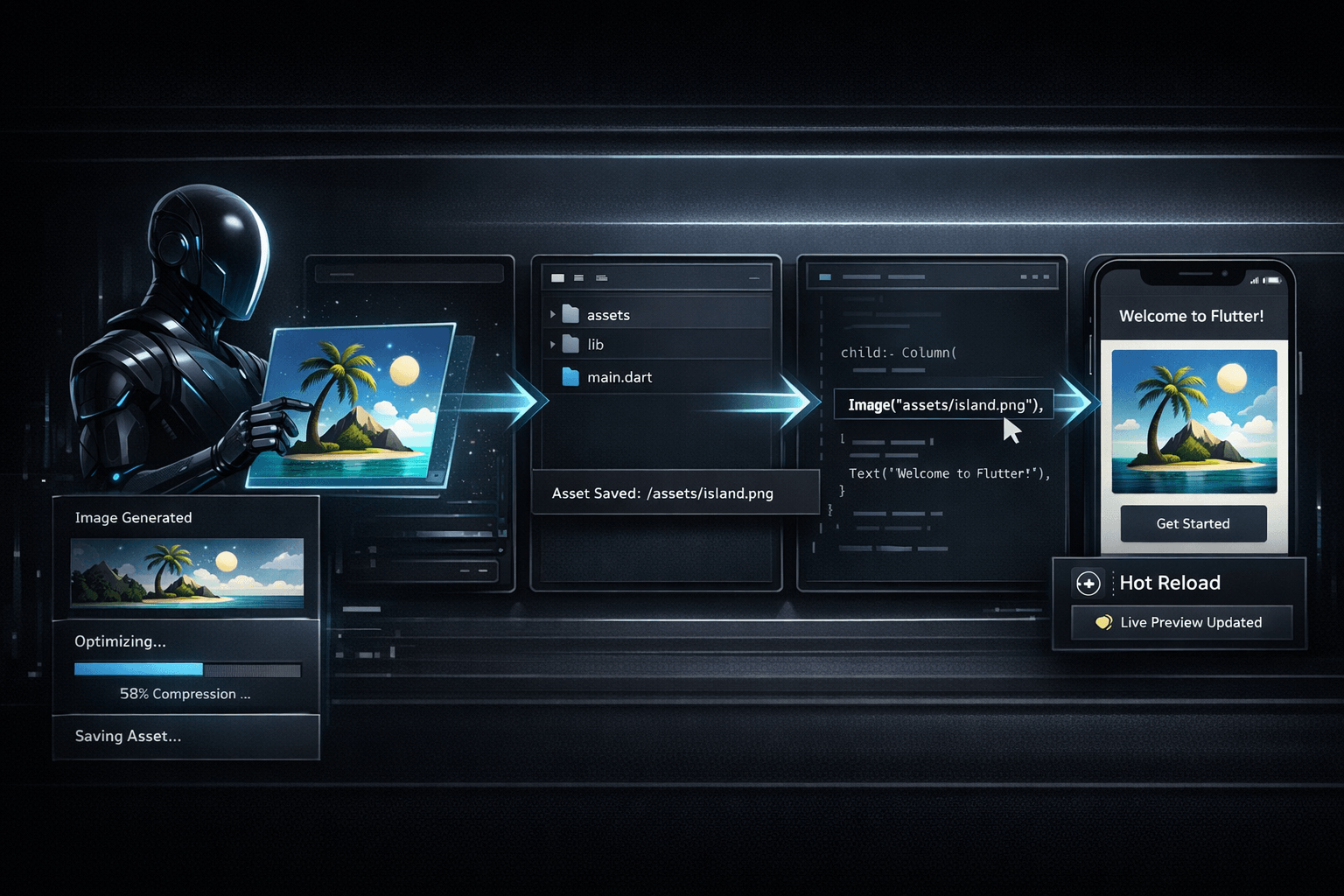
The practical value of AI in a Flutter workflow is often decided by continuity. Generating an image is easy to demonstrate in isolation. The harder and more useful task is keeping the asset connected to the codebase: placing the file where the project expects it, respecting naming, avoiding duplicates, updating the implementation and validating the result with hot reload. That is the specific angle of this Nic Hyper Flow workflow.
Summary
Flutter's asset documentation explains that bundled files are declared in pubspec.yaml, packaged into the asset bundle and then loaded at runtime through logical paths. The hot reload documentation explains that updated Dart code can be injected into the running debug session and the widget tree rebuilt quickly, while also documenting the cases where a fuller restart is still required. Those two official pages frame a useful distinction: asset management is explicit and file-based, while visual iteration is fast once the asset has been placed correctly.
That makes the full pipeline meaningful. If one agent can generate the missing visual, compress or optimize it, save the final file into the project structure, reference that path in code and then help validate the result after reload, the developer avoids several small but expensive handoff steps.
What happened
A clearer pattern is emerging in developer tooling: the useful unit of work is no longer only a code edit or only an image output. It is a repository-aware change set that may include both. In a Flutter project, this often means a UI task starts with a missing illustration, placeholder, banner or screenshot-like visual and ends only when the running application points at the correct asset path and displays the result as expected.
In many setups, developers still perform these steps manually across separate tools. They generate the image elsewhere, export it, rename it, compress it, copy it into the project, update the widget code and only then test the result. The process works, but it introduces friction at every file boundary.
Why it matters
The lost time in asset work usually comes from glue logic rather than creativity. A visual might be acceptable on the first attempt, yet the implementation still fails because the file was saved under the wrong name, left uncompressed, stored in the wrong folder or referenced with the wrong relative path. These are mundane mistakes, but they break the loop.
A context-aware agent reduces that fragility because it is operating inside the same project constraints as the implementation. It can see the destination folder, the naming convention, the article or screen being changed and the code that will consume the asset. That allows the asset decision and the code decision to reinforce each other instead of drifting apart.
The real gain is not that an image was generated. It is that the generated file becomes a valid project asset with a known path, a useful filename and an immediate implementation target.
Full asset pipeline
The end-to-end workflow is straightforward to describe but easy to fragment in practice. First, the agent generates the visual with knowledge of the target screen, article or component. Second, it optimizes the output so the final file is lighter and more suitable for shipping or previewing. Third, it saves the asset into the intended project location instead of leaving it in a temporary export folder. Fourth, it updates the relevant code or markup so that the saved file is the one actually used. Finally, the developer checks the result in the running app or page.
Flutter's asset model makes this especially concrete. According to the Flutter documentation, assets are declared relative to pubspec.yaml, bundled for runtime use and then loaded through paths such as AssetImage('assets/background.png'). This means file placement is not an afterthought. The saved file path is part of the implementation contract.
Compression also matters, even when the immediate target is a local development build. MDN's image format guidance notes that modern formats and compression choices can materially reduce file size, and that screenshots and UI-oriented imagery often benefit from lossless or carefully chosen formats. The exact format choice depends on the target platform, but the broader principle is stable: assets should not enter the codebase as oversized throwaways if they are likely to remain in use.
In a credible workflow, the agent should also leave the repository clean. That means keeping the final saved file, removing disposable intermediates when they are no longer needed and making sure the code references the surviving asset rather than an outdated temporary export.
Flutter application
This matters in Flutter because the feedback loop after the file work is already quite fast. The hot reload documentation explains that Flutter injects updated source files into the Dart runtime and rebuilds the widget tree in debug mode, preserving state in many cases. For asset-related work, that usually means the developer can quickly verify adjacent code changes, layout adjustments or image placement once the correct file is in the project.
The boundary conditions are important. Hot reload does not remove the need for a fuller restart in every case, and file changes outside the Dart execution path may still need a more deliberate validation pass. But as a day-to-day workflow, pairing repository-aware asset handling with Flutter's fast UI iteration is still materially better than treating image generation as a disconnected side task.
The strongest version of this pattern is when the same agent handles both sides. It does not merely propose an image and separately suggest code. It generates the asset for the exact use case, saves it under the final filename, updates the implementation and leaves the project in a state where the next reload is meaningful.
Connection to Nic Hyper Flow
Nic Hyper Flow is relevant because it lets the same agent operate across the whole chain instead of stopping at content generation. That continuity is what makes context-aware asset generation more useful than isolated image generation. The agent already knows what is being built, where the file should live and which code path will consume it.
In practical terms, that means one workflow can cover all of the following: create the visual asset, keep the optimized output, delete temporary versions, rename the surviving file to the expected production name, reference that exact filename in HTML or Flutter code and then validate the visible result. The asset is not a side artifact. It is part of the implementation.
This article package follows that same principle. Its cover image is stored locally as cover.png, and that exact file is referenced by the article markup and metadata. The important idea is not the filename itself. It is that the file, the reference and the published content stay aligned.
Conclusion
For Flutter developers, the full asset pipeline deserves more attention than the generation step alone. Official Flutter documentation already gives a reliable model for declaring and loading assets, and hot reload gives a fast way to validate many UI changes during debug sessions. The remaining challenge is operational: turning a generated visual into a correctly named, correctly placed, correctly referenced project file.
A single context-aware agent makes that loop tighter. It can generate the asset, optimize it, save it, connect it to the code and leave the developer closer to a real result instead of a loose export. That is not a dramatic claim, but it is a useful one for teams that work at the boundary between UI decisions and implementation details.
Sources
This article was prepared with reference to the following documentation pages: